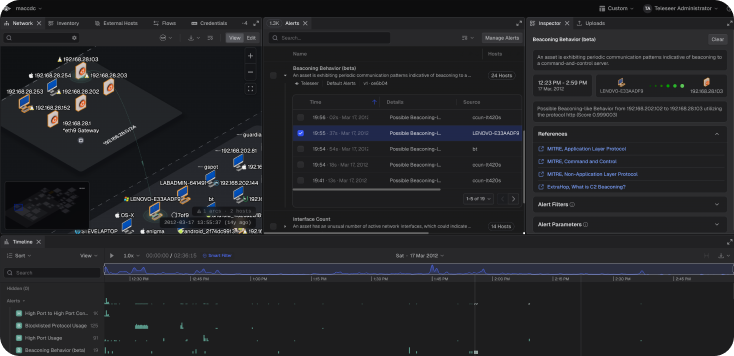
Timeline Alert Visualization - Alerts can now be correlated to traffic easily in the timeline which can help further isolate suspicious assets in the topology.
Timeline Alerts Visualisation.
Secondary Timezone Display - A secondary timezone in “Date & Time” preferences has been added. When enabled, hovering over any timestamp in Teleseer will show the time in both the primary and secondary timezones together.
MAJOR UPDATES
Billing and Subscription Management - Cloud subscription management, payment detail updates, and access to the customer portal is now available directly from the Teleseer platform, with faster load times and a smoother experience when switching between plans.
FIXES
Alerts Edit Panel - Dismissing the alert edit panel without saving no longer leaves the screen dimmed and unresponsive.
Blocklisted Application Usage Alert - The L7 protocol options are now scrollable.
Project Renaming - Live streaming projects will now retain a new name assignment.
First Project Setup - When making the first project in an on-prem version of Teleseer the workflow will now prompt for a file selection.
Timeline Zoom - Fixed issue where the timeline and network panel would crash on Windows Chrome when zooming out.
File Uploads - File uploads no longer occasionally fail due to a background process interfering with the upload.
Switching Tenants - Fixed an issue where Teleseer would lag when switching tenants.
Vulnerability Score - Metrics no longer fade away or require a view toggle to restore.
Projects Panel - The project description panel is now scrollable to view additional notes, and no longer overscrolls at the bottom or shows a lingering scroll indicator when scrolling past the top.
Display - The alerts panel now correctly fills the full width of the screen on wide monitors.
Timeline Manipulation - Dragging the playhead while traffic is playing now moves it to the correct position instead of snapping back to the start.
3D Mode Topology - The minimap can now be disabled in 3D mode.
Workspace Switcher - Newly added workspaces now appear in the workspace switcher without needing to log out and back in.
GreyNoise Tags - GreyNoise tags no longer appear intermittently or persist incorrectly on external host and asset details.
OPTIMIZATIONS & ENHANCEMENTS
Managing Alerts - The Manage Alerts panel has been improved with better support for enabling or disabling rules, adjusting alert filters, and searching across rules by name or description. Clicking an alert opens its configuration details, where settings can be edited, previous versions browsed, and changes reverted. Toggling an alert on or off without changing any configuration will not create a new version, and only saved configuration changes increment the version.
Teleseer UI - Polish across the app: tightened Alerts spacing, aligned button/input/menu sizing with design standards, clarified ingest upload status copy, restored map detail panel tails, and fixed tree row arrow sizing.